Quotes people keep re-opening
They've looked four times. Nobody rang. It's not lost — it's just sitting there, and every product on the market will send a reminder instead of making the call happen.
 Kindra AI
Book a free Leak Check
Kindra AI
Book a free Leak Check
For sign shops · Brisbane-built · you own the code
One system that runs a sign shop from the first phone call to the paid invoice — quoted on the driveway, ordered without anyone remembering to, and unable to let a warm quote go quiet.
Not off-the-shelf. Built around how your shop already works.
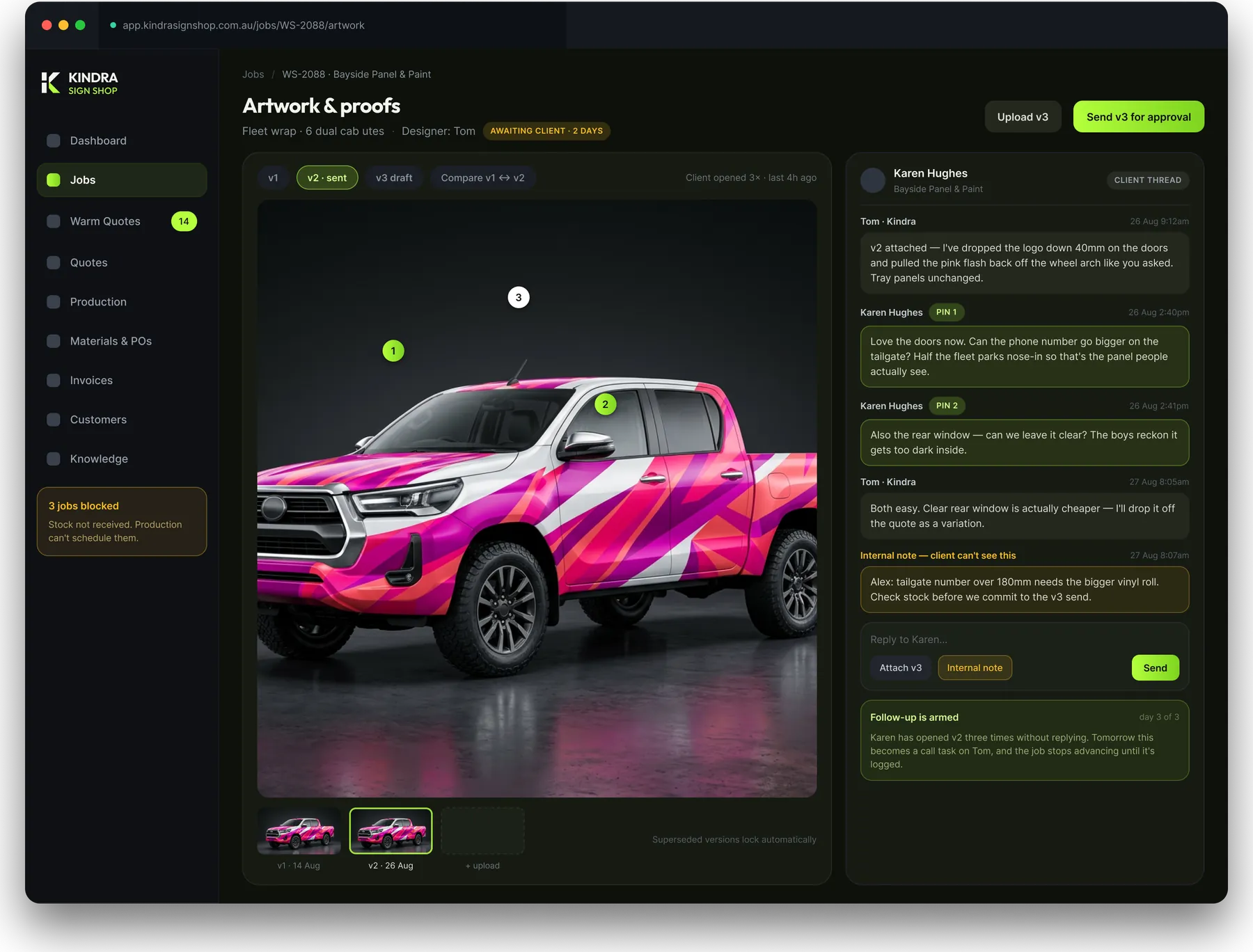
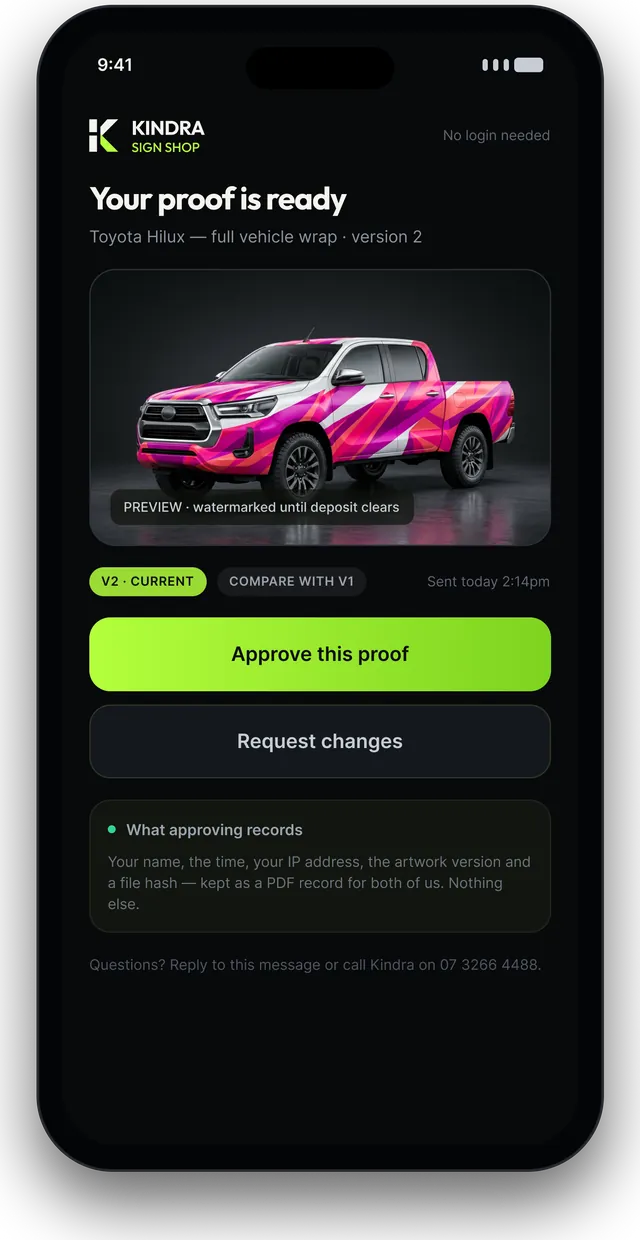
Artwork & proofs · what the client sees · from a working build

Chapter one
The work is not the problem. The remembering is.
The four leaks in every sign shop
They've looked four times. Nobody rang. It's not lost — it's just sitting there, and every product on the market will send a reminder instead of making the call happen.
You get to the day it's meant to print and find out the ACM never landed. The order was somebody's job to remember.
An accepted quote gets typed again by hand. Then the variation gets typed again. Then somebody forgets the variation.
Your most expensive hour is also your most interrupted one, because every question a designer has walks upstairs instead of joining a queue.
What it watches while you're on the tools
Figures shown are from the demo build. Yours are your own — and most shops have never seen any of these four.
Why we don't just point you at software
A shop doing shopfront fitouts has almost nothing in common with a shop doing fleet wraps and illuminated pylons. So the product gets built for the middle, and every shop that buys it ends up bending their work to fit the software instead of the other way round.
It can't
Your rates. Your panel areas by body type. Your travel zones, EWP hire, after-hours loading, markup by product family. A rented system gives you a rate card and a text box. Yours gets your actual formulas, so the price that comes out is the price you'd have written by hand.
It can't
Everything on the market sends reminders. Nothing stops a job moving forward until someone has actually rung the customer and logged what was said. That rule is the difference between fifty grand sitting in re-opened quotes and fifty grand of work.
It can't
The person whose time costs most spends it answering questions anyone could answer. Someone re-keys accepted quotes into Xero. Someone sends four emails into silence and doesn't know they're allowed to ring. Those aren't software problems in general — they're yours specifically.
And
No per-seat licence, so put installers and production staff on it without thinking about cost. The code, the data and the design files are yours, in your own hosting account, in your name. If you ever want to hand it to another developer, you can.
Follow one job all the way through
Every screen below is from a working build. The shop in these shots is called Kindra Sign Shop — yours carries your name, your logo and your colours on every screen, PDF, email and client-facing page.
Stage 01 · Site visit
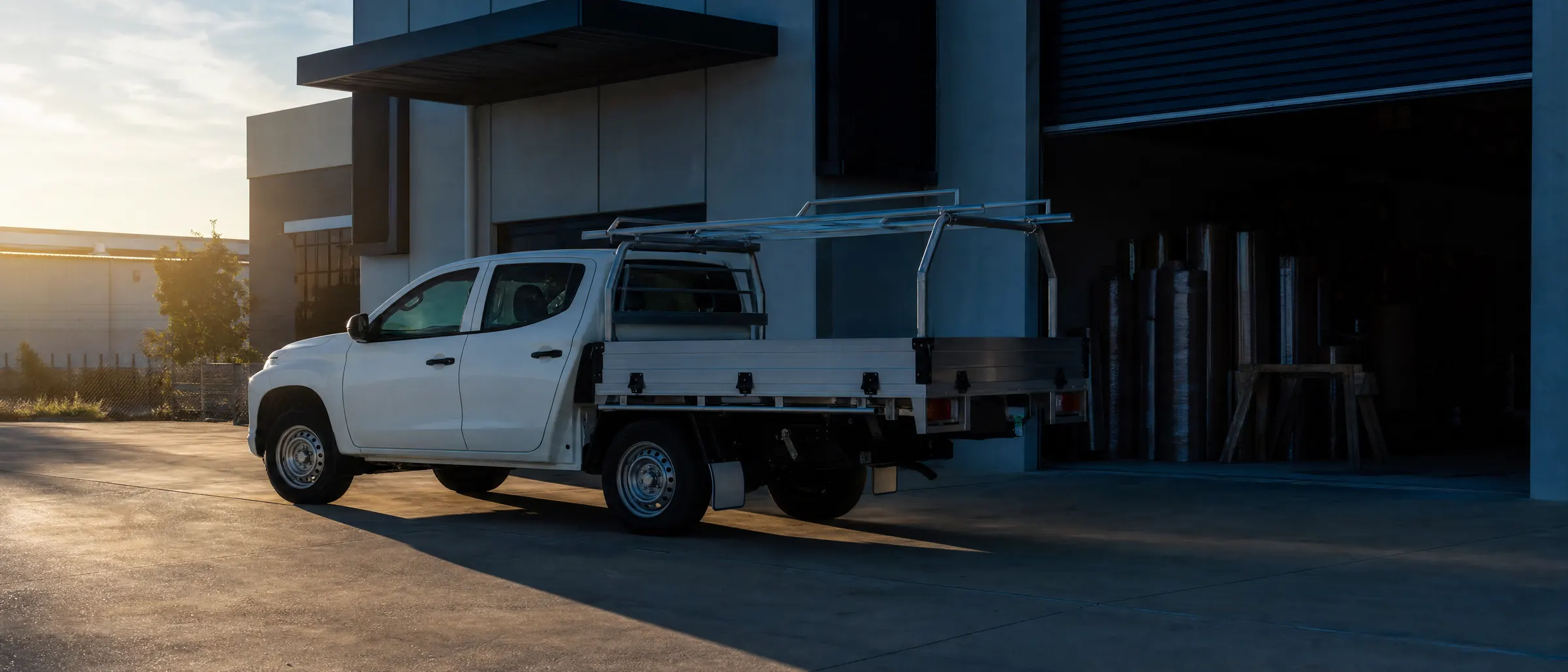
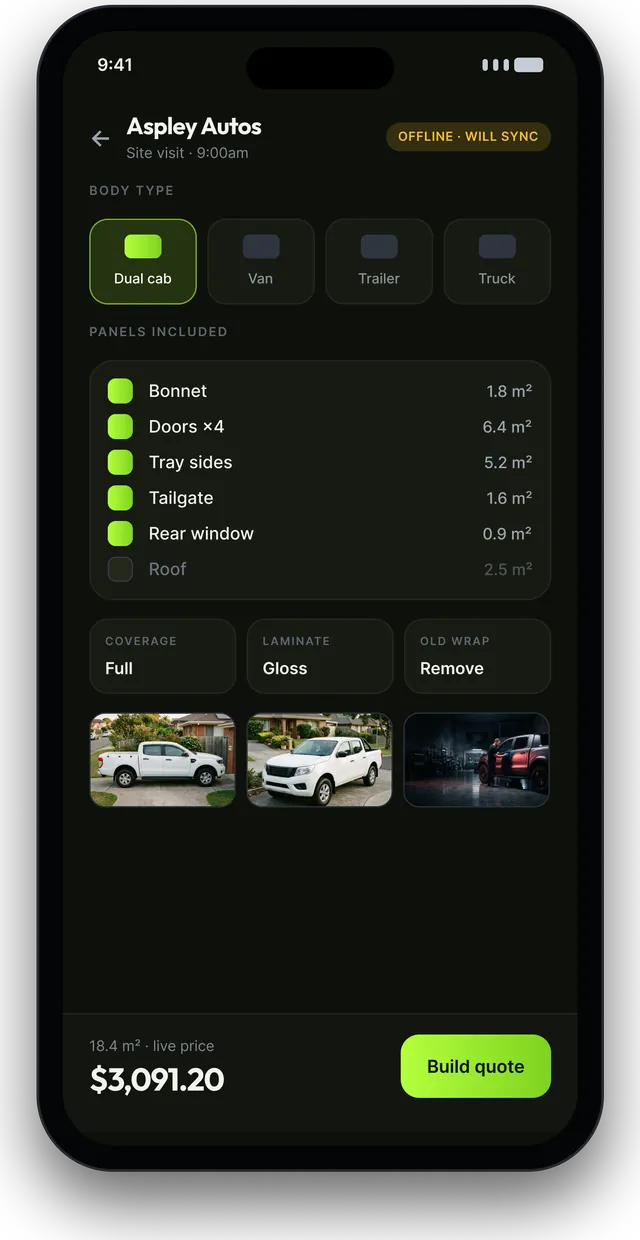
Pull up at a fleet job with six utes. Pick dual cab, tick the panels — bonnet, doors, tray sides, tailgate, rear window — and the price moves as you go. The body-type templates already know the panel areas, so a six-ute quote takes minutes instead of an evening.
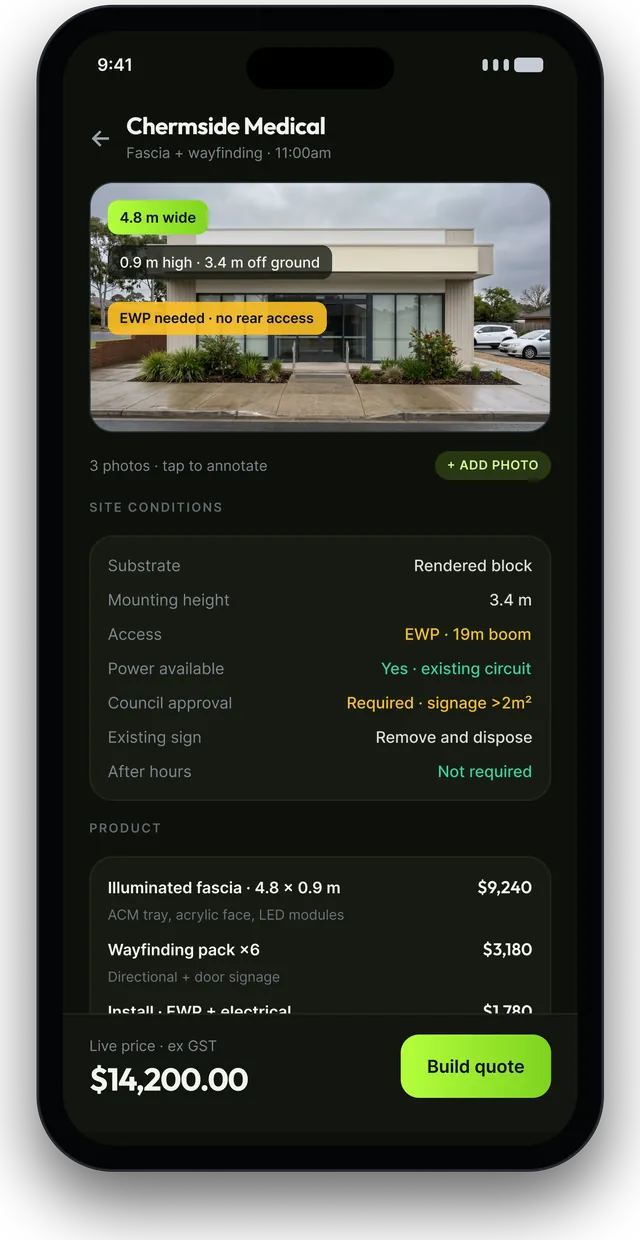
Building jobs get their own survey: substrate, mounting height, access, power, fixings, council flag, whether the old sign's coming down. Photographed and marked up on the spot.
Works with no reception. Syncs when you're back in range.
Stage 02 · Quoted
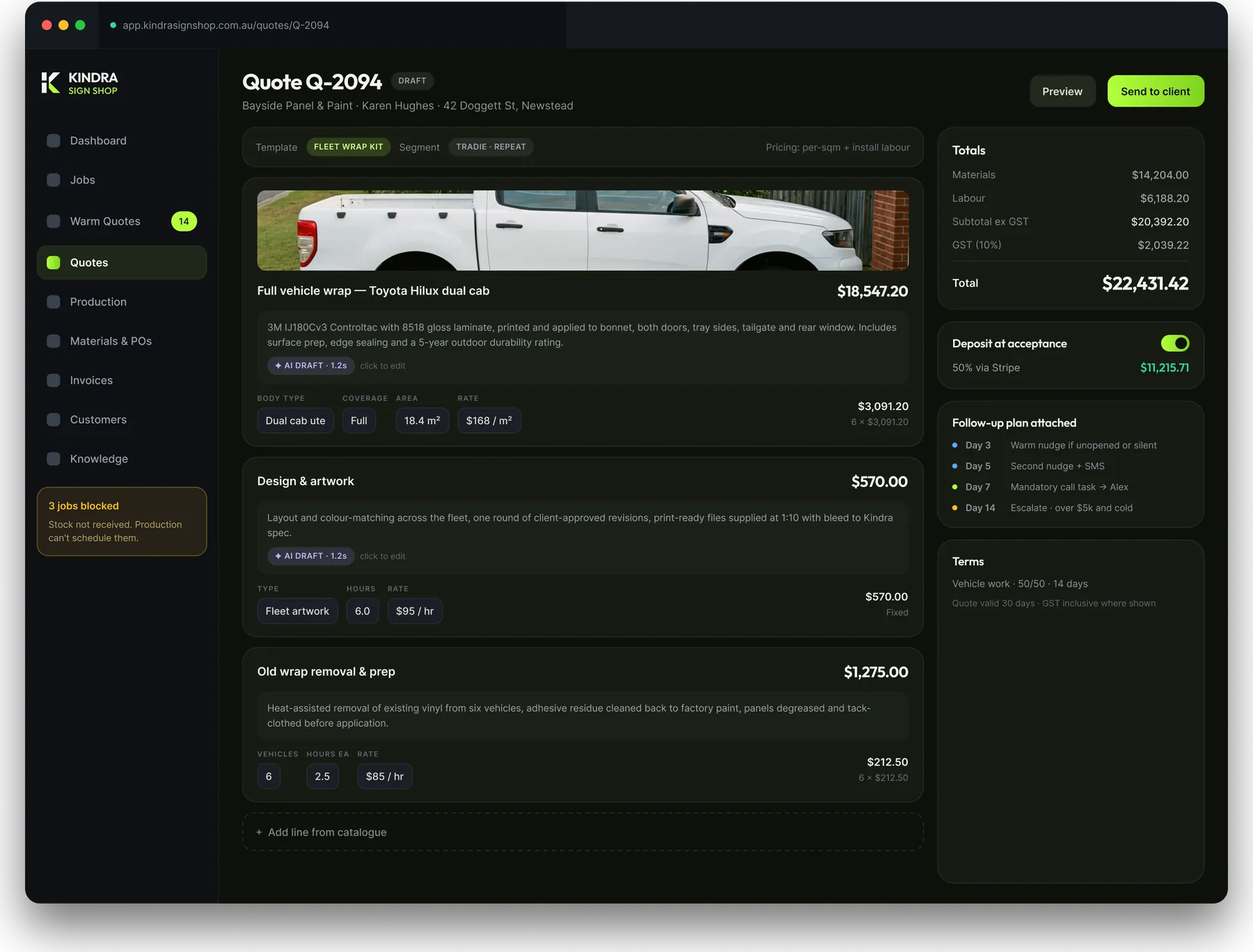
Your pricing engine, not a spreadsheet. Per square metre, per linear metre, per panel, fixed, tiered. Labour split by activity — design, fabrication, print, application, install, site works. Materials and labour split correctly for GST.
The AI drafts the customer-facing description on each line in your voice, editable before it goes. It never invents a specification or a price — those come from what you punched in.
Every line carries a bill of materials underneath it. Quiet, but it's what lets purchase orders raise themselves later.
Stage 03 · The money one
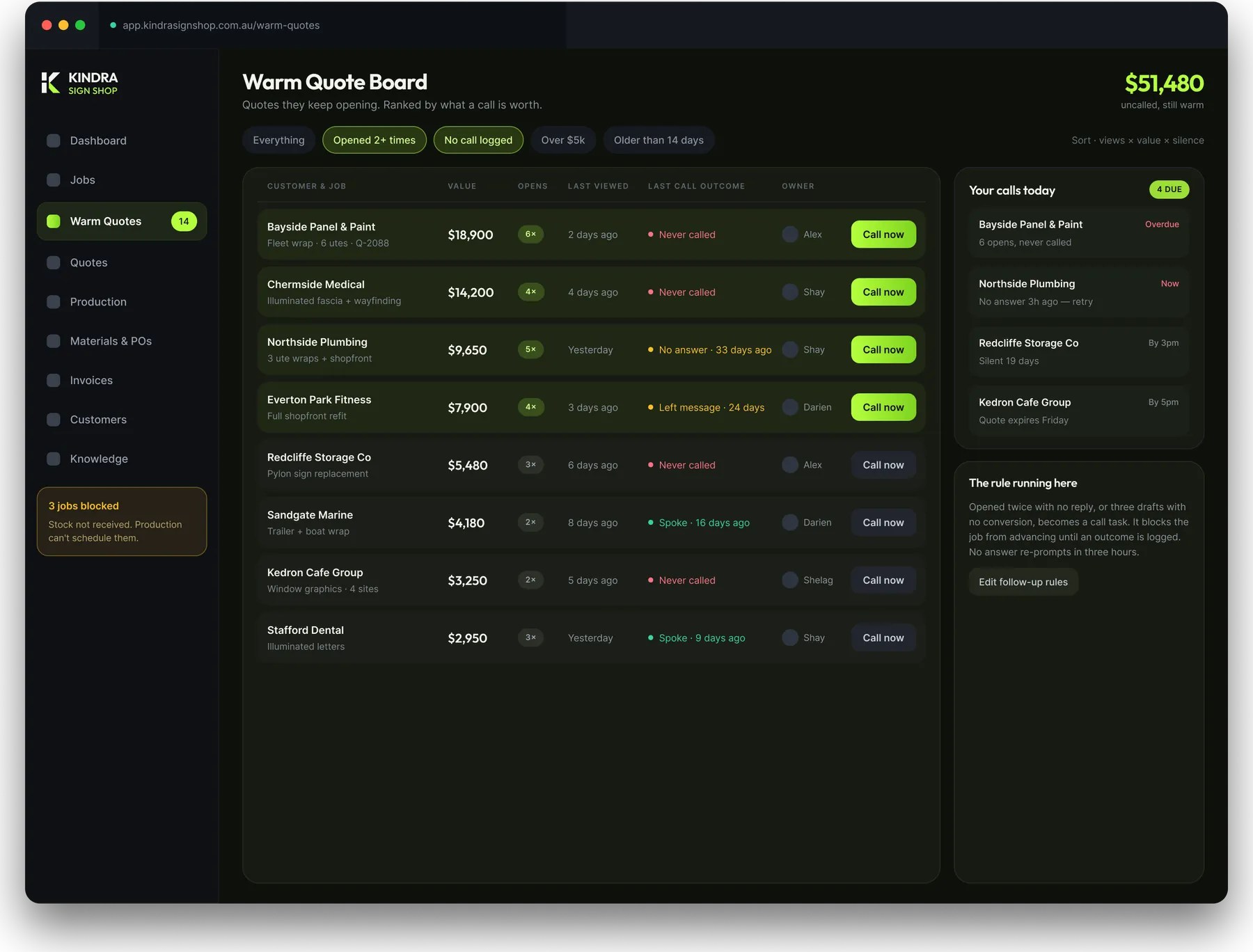
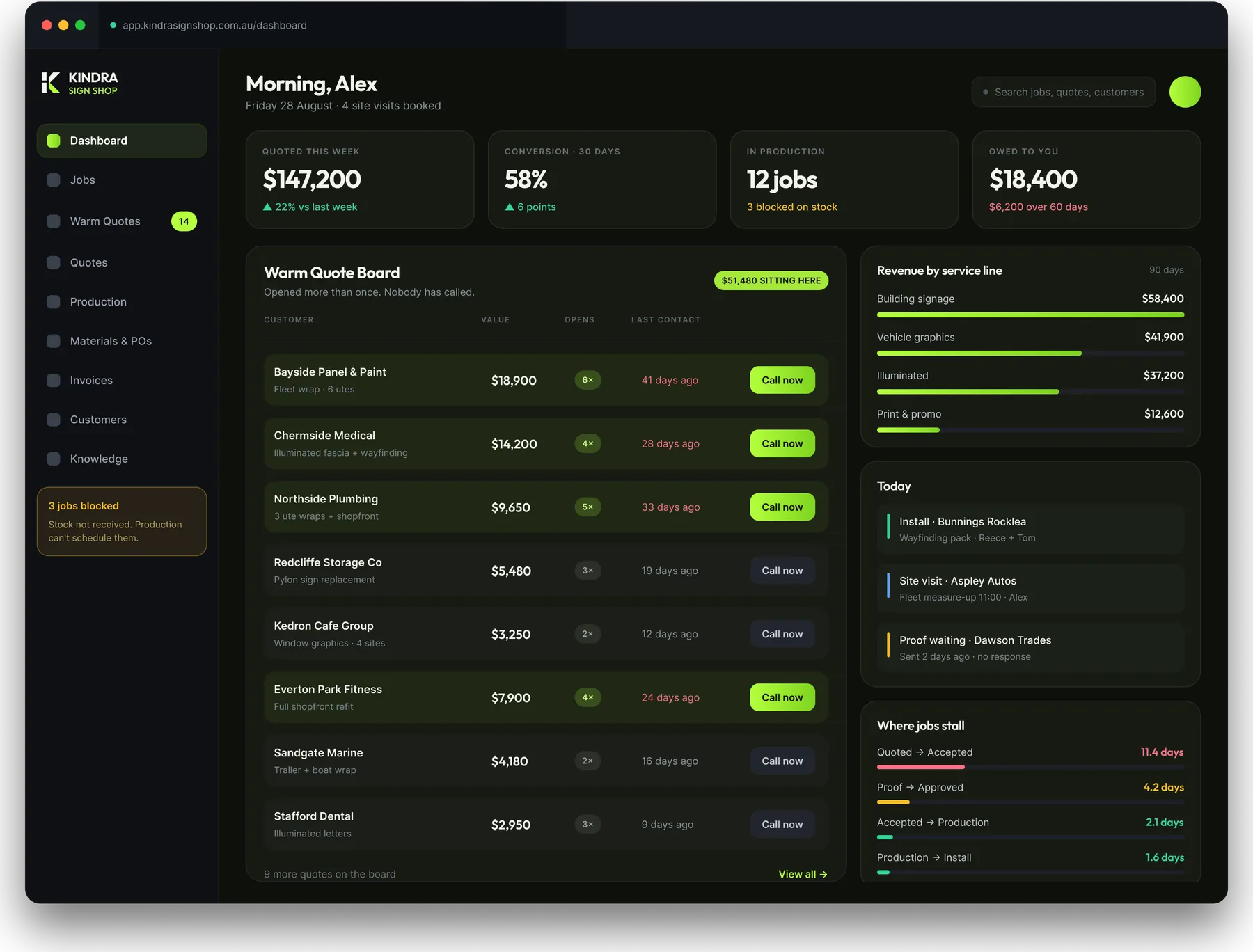
Every quote you send gets a link, and that link is watched. Who opened it, how many times, how long they sat on it, which lines they kept going back to.
Then the part that matters: a quote opened twice with no reply becomes a phone call. Not a reminder — a call task, on whoever owns the quote, showing red on their screen. The job can't move to the next stage until someone logs what happened: spoke, no answer, left a message, not proceeding. "No answer" puts it back in front of them three hours later, business hours only. Over five grand and gone cold, it lands on you.
In the first shop we built this for, the top of that board was about fifty thousand dollars of work customers had been re-reading for months while nobody called.
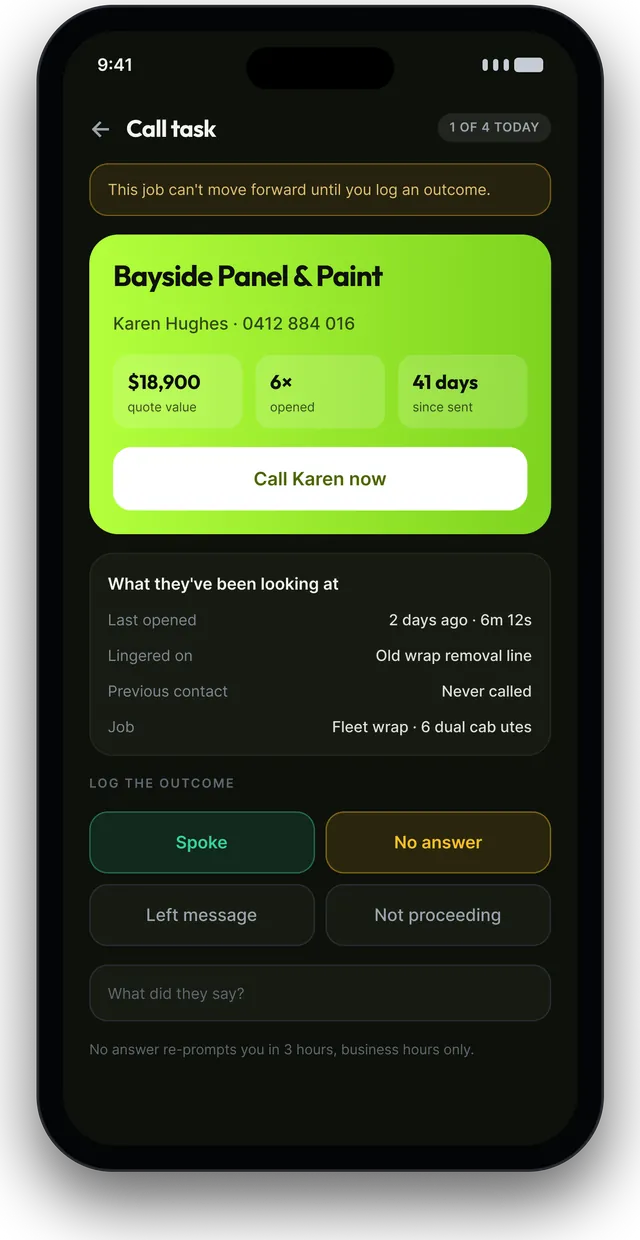
Stage 04 · Design & proof
Artwork and the client conversation live in one place. Comments pin straight onto the artwork — "can the phone number go bigger on the tailgate" attaches to the tailgate, not to an email thread. Versions stack up and supersede automatically, and the old ones lock.
Internal notes sit in the same thread but the client never sees them, so you can flag "check we've got the wider vinyl roll before we commit" without it going out the door.
The client approves on a link on their phone. No login, no account. You get their name, the time, their IP, the artwork version and a file hash, downloadable as a PDF record. Bring that to any dispute.
Stage 05 · Materials
When a quote is accepted, the bill of materials turns into a draft purchase order in the background. Under your threshold it goes on its own. Over it, it waits for you — approved from your phone with a tap.
Around fifty core line items, tracked simply. ACM, vinyl, laminate, acrylic, LED modules, fixings, ink. Not a warehouse system: no expiry dates, no stocktakes, no barcodes. Just enough to know what's in the racks, with an append-only ledger behind it so any number can be explained.
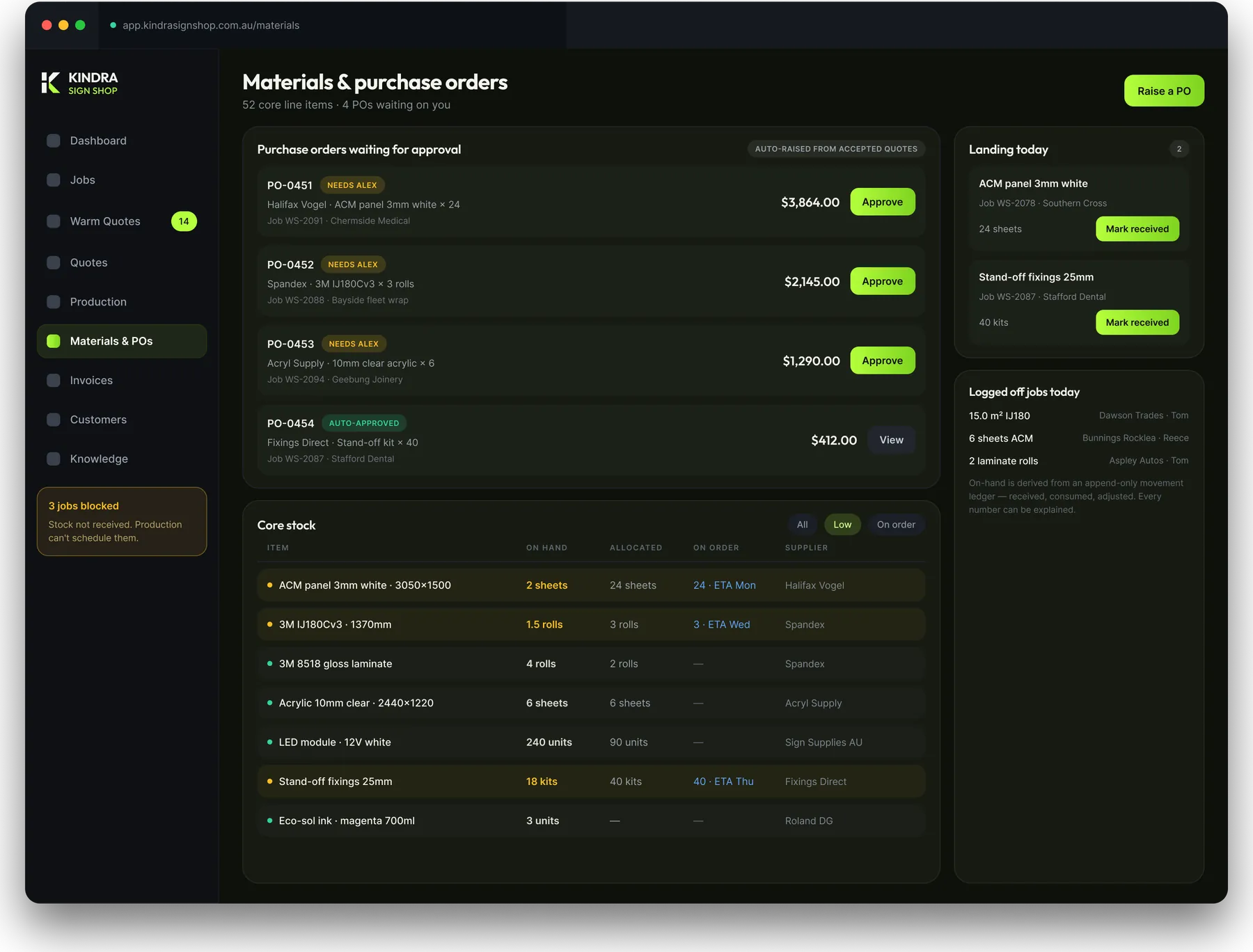

Meanwhile, on the floor
The system does the remembering. The shop keeps doing the work the way it already does it — the phone in someone's pocket is the only new tool on the floor.
Stage 06 · Production
Stock gets marked as received against the job. And here's the rule that changes the week: production can't schedule a job until its materials are in. No more getting to the day it's meant to print and finding out the ACM never landed.
The floor gets its own board — print queue, fabrication, finishing, install — with install scheduling against crew capacity and a display mode for a screen in the workshop.
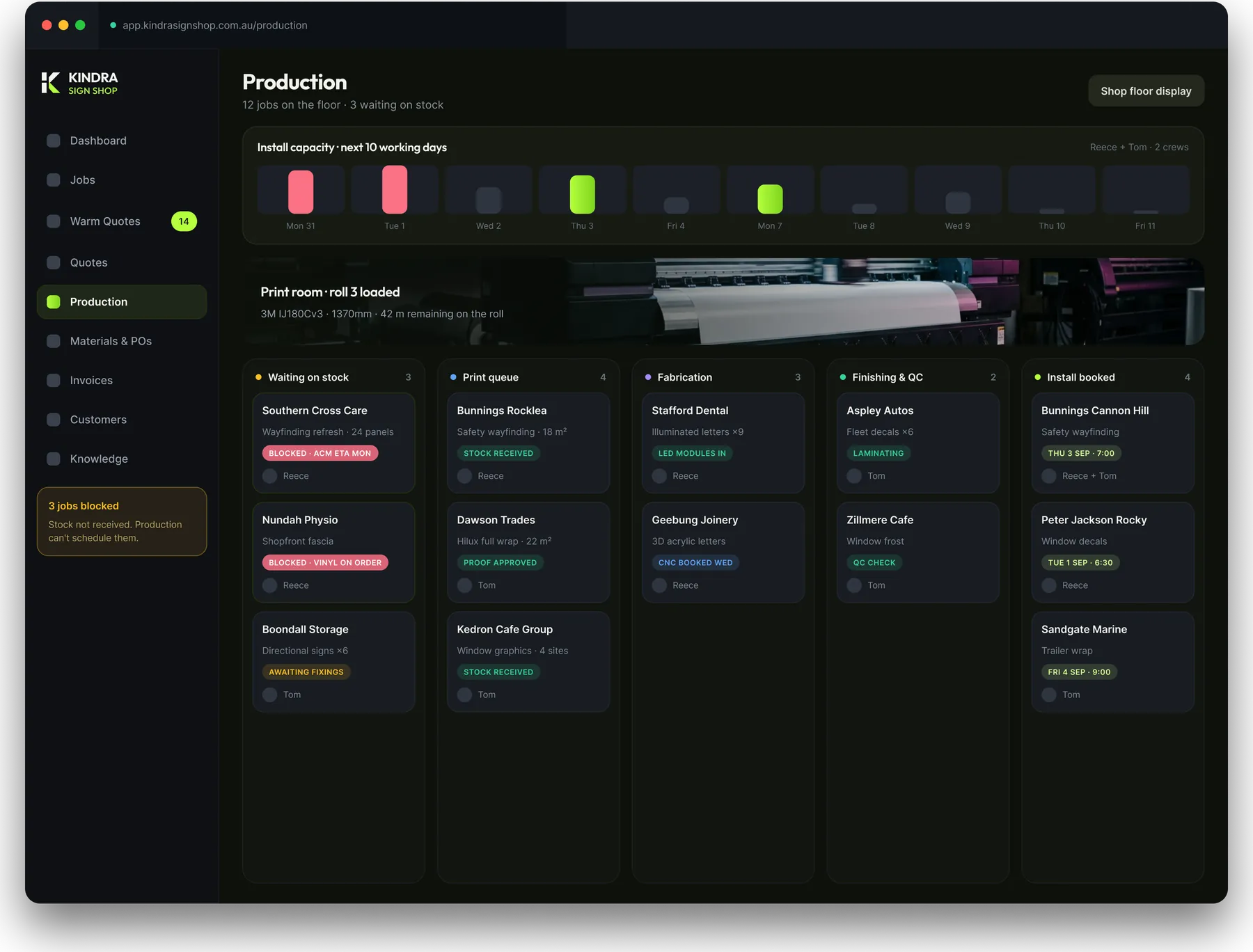
Stage 07 · Install
Every site note taken at the survey follows the job all the way to the crew. Access, gate codes, height, whether power is needed, what to watch out for, who to ask for on site.
They tick off what went up, photograph it, get the client's signature on the phone, and log the vinyl they actually used — which is what keeps stock honest.
Nobody turns up to a job nobody described to them.
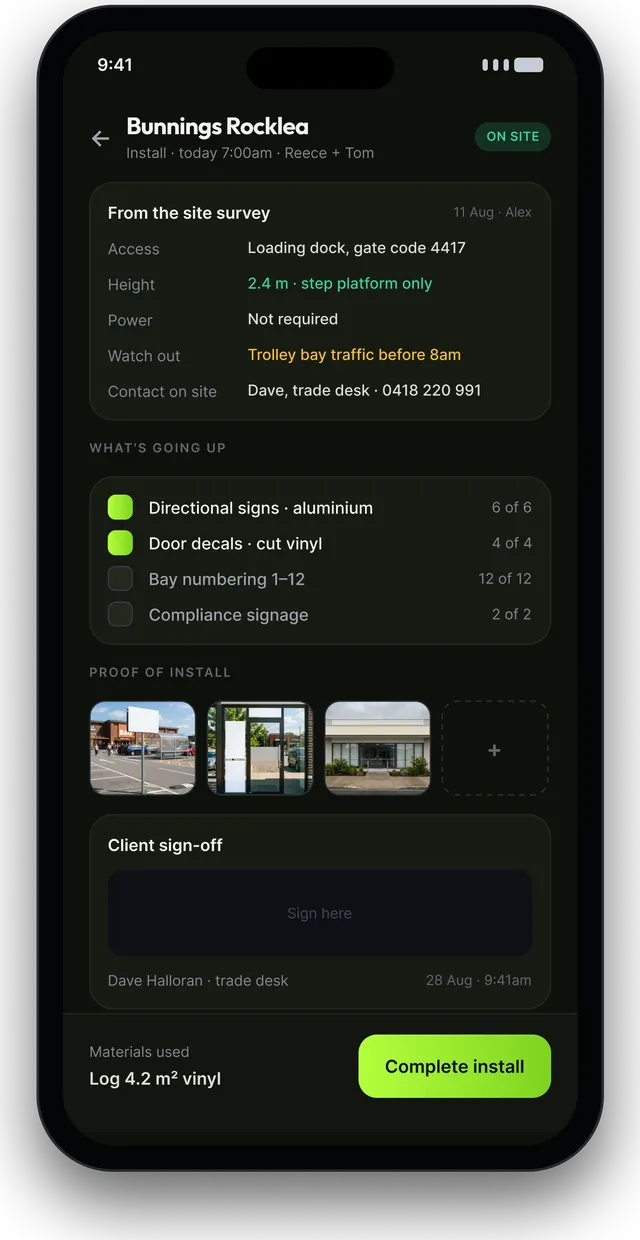
Stage 08 · Invoiced & paid
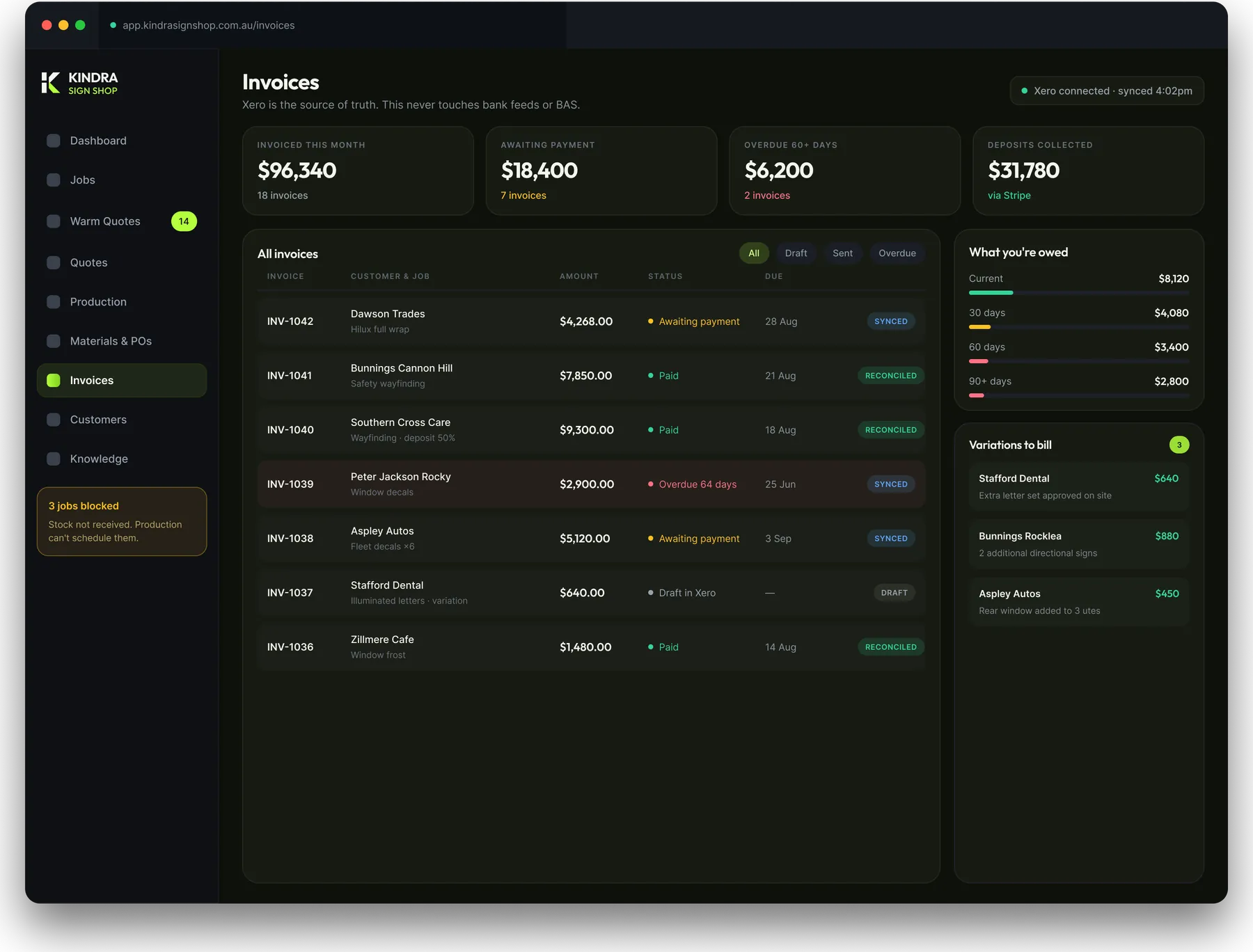
An accepted quote becomes an invoice in one click, including variations added mid-job. Deposits, progress claims, final invoices. It pushes to Xero as a draft and reads payment status back, so a job shows paid the moment Xero reconciles.
Xero stays your accounting system. This never touches your bank feeds or your BAS. Stripe pay-link and BPAY go on every invoice — on a big deposit, bank transfer costs you a lot less than card, and the customer gets both so you can steer it.
All of it · One shop
You see everything — quoted this week, conversion, revenue by service line, what's owed, job profitability, where jobs are stalling, and which campaign produced which dollar. Sales gets the same numbers through a sales lens. Designers see proofs waiting. The floor sees the floor. Installers get a phone view.
And the fix for the interrupted hour: requests route as tickets with an owner and a due time, not as a tap on the shoulder. Anything a designer would walk upstairs to ask becomes a queued task.
The shop's own knowledge lives in it too — bleed, file setup, substrate specs, install methods, colour profiles, how to quote a wrap. Searchable from inside a job, so the answer turns up where the question gets asked. Every article has an owner and a review date, so it doesn't rot.
Chapter two
Same crew. Same trucks. Same Friday. One fewer thing living in someone’s head.
The signature
Scroll the day. This is what the change actually feels like from the inside.
7:04am
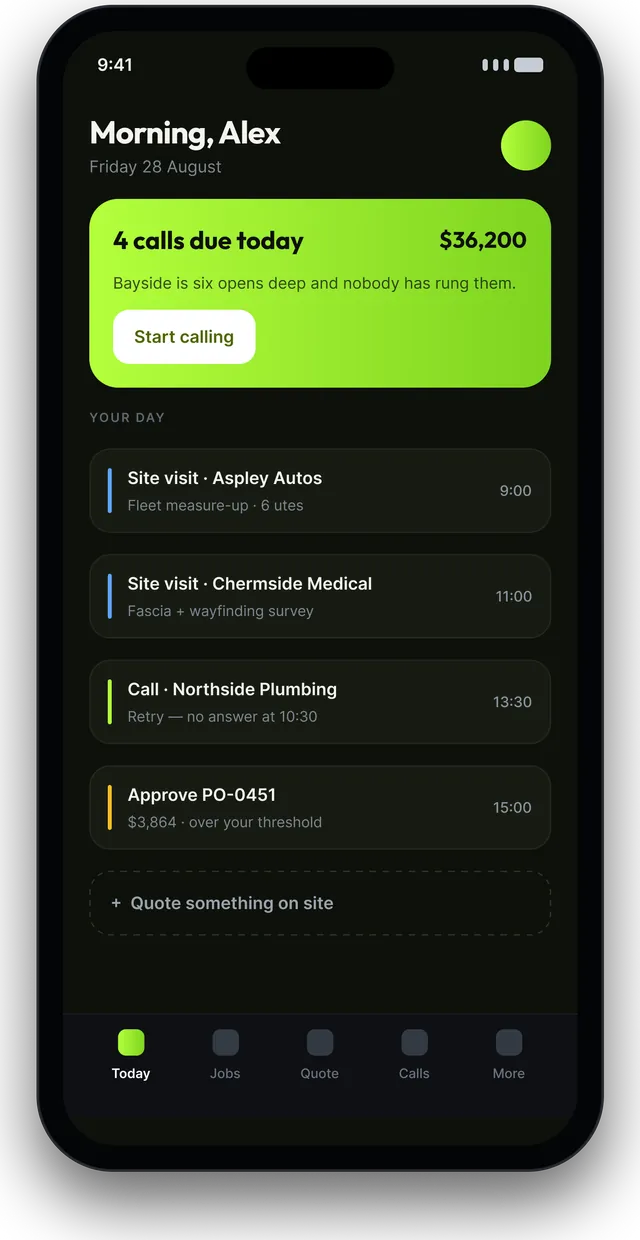
Coffee, phone, one screen. Four calls due today with $36,200 sitting behind them. Bayside is six opens deep and nobody's rung them. Two proofs waiting on clients. One PO over your threshold.
7:11am
Approve the PO — twenty-four ACM panels, raised itself off the accepted quote overnight. One tap.
8:20am
Aspley Autos measure-up. Six utes. Body type, panels, photos, price moving as you go. Quote sent from the driveway with a deposit link before you're back in the car.
9:30am
Bayside's card is red and the job won't advance. You ring Karen. She wants the tailgate number bigger. Outcome logged, note attached, job moves.
11:15am
Tom's proof comes back approved on Karen's phone, with a timestamp, her IP and a file hash. Production gets told without anyone forwarding anything.
1:40pm
Reece is blocked on the Chermside job and you already knew — the ACM's been flagged since Monday, not discovered this afternoon.
3:05pm
Two quotes accepted today are already draft invoices in Xero. Nobody has re-typed a thing.
4:50pm
Laptop shut. Four calls made and logged, one quote sent from a driveway, one proof approved with a paper trail, one order placed. Nothing chased, nothing forgotten.
What "built for you" actually means
If your work changes — a new service line, a new way of pricing, a fourth crew — the system changes with it. That's a conversation, not a feature request in a queue behind three thousand other shops.
Nothing hidden
Sixteen screens from a working build. Drag the rail, or click any screen to open it.
Naming this matters as much as the rest
Xero stays your accounting system. We push drafts in and read payments back. Nothing near your bank feeds or your BAS.
That's compliance risk neither of us needs to take on.
Fifty core items tracked simply does the job. Barcodes can be their own project later if you want them.
The web app goes on the home screen and works offline where it actually matters — on site.
Real, and worth doing, but it's its own module once the rest is running.
The system gives you the attribution so you can finally tell what's working. Your marketing people keep spending the money.
Two things that have to come from your side
01
You have to ask for it personally — they'll bounce it if your bookkeeper asks. It gets us the leads mailbox and takes a few thousand a year of change-request billing off the table.
02
Nobody outside your shop can write that. It's the difference between a pricing engine that's yours and one that's a guess.
From yes to running
No big-bang launch. The shop keeps trading the whole way through.
I sit with whoever quotes, whoever orders and whoever chases. Every step goes on a wall, including the ones that only live in someone's head. You get that map whether or not you go ahead.
Week 1Your rates, your panel areas, your substrates, your labour splits. This is the part that makes a quote take minutes instead of an evening, and it can't be guessed — it comes out of your head and your last hundred jobs.
Weeks 2–3One part, working, in real use. You quote a real job on a real driveway while the rest is still being built. If the pricing is wrong you find out in week four, not at handover.
Week 4Warm quotes, proofs, materials, production, install, invoicing. Each one lands, gets used for a week, gets adjusted. Nothing goes in that nobody asked for.
Weeks 5–10Source code, server, database, deployment notes and a walkthrough for the team. You own it outright. I stay on for support if you want it, and the system keeps running if you don't.
Week 11The questions every shop asks
A build like this runs into five figures, and the range is wide enough that a number before the two days in your shop would be a guess. What I can tell you up front: you pay in stages against working software, not a lump sum against a promise, and there is no per-seat licence at the end because you own it.
Customers, jobs and history come across. Anything with a consistent shape migrates cleanly; anything that lives in a spreadsheet with four different date formats needs a decision about what's worth keeping. That decision is yours, and it's one of the week-one jobs.
Yes — invoices raise in the system and land in Xero, and payment status comes back so the job knows when it's actually paid. Xero stays the accounting system. This never tries to be your ledger.
Fair, and it's the risk that sinks most of these projects. Which is why the installer's phone screen has four things on it and the job can't advance until one of them is tapped. If a screen needs explaining twice, it's the wrong screen and it gets rebuilt.
You have the source code, the server and the deployment notes from handover day. It's a standard stack — any competent developer can pick it up. That's the practical argument for owning it rather than renting it.
Every screen on this page is a working build, not a mockup. The 20-minute meeting walks through the ones that match your shop, and the two days in your shop happen before any build commitment.
Chapter three
Start the conversation
Twenty minutes on the phone. No demo, no slides. We go through where work leaks out of your shop and put a number on it — then you decide whether that number is worth doing anything about.
Start here
It starts with a free 20-minute leak check — a conversation, not a demo. We go through where the work leaks out of your shop and put a number on it. If the number's too small to be worth fixing, we'll tell you that.
Michael · Kindra AI · Brisbane · hello@kindraai.dev
The rest of the family
Each one is the same idea — your quoting, your jobs, your invoicing, in one system you own — fitted to how that trade actually works. Built in Brisbane by Kindra AI.